vim-sandwich
============
[](https://travis-ci.org/machakann/vim-sandwich)
[](https://ci.appveyor.com/project/machakann/vim-sandwich/branch/master)
`sandwich.vim` is a set of operator and textobject plugins to add/delete/replace surroundings of a sandwiched textobject, like **(foo)**, **"bar"**.
# Quick start
### Add
Press `sa{motion/textobject}{addition}`.
For example, a key sequence `saiw(` makes **foo** to **(foo)**.
### Delete
Press `sdb` or `sd{deletion}`.
For example, key sequences `sdb` or `sd(` makes **(foo)** to **foo**.
`sdb` searches a set of surrounding automatically.
### Replace
Press `srb{addition}` or `sr{deletion}{addition}`.
For example, key sequences `srb"` or `sr("` makes **(foo)** to **"foo"**.
That's all. Now you already know enough about `sandwich.vim`. If you are using [vim-surround](https://github.com/tpope/vim-surround), you can use a preset keymappings similar as it. See [here](https://github.com/machakann/vim-sandwich/wiki/Introduce-vim-surround-keymappings)
`sandwich.vim` has some functional input for *{addition}*/*{deletion}*. Check [here](https://github.com/machakann/vim-sandwich/wiki/Magic-characters)!
# Design
This plugin provides functions to add/delete/replace surroundings of a sandwiched text. These functions are implemented genuinely by utilizing operator/textobject framework. Thus their action can be repeated by `.` command without any dependency. It consists of two parts, **operator-sandwich** and **textobj-sandwich**.
### operator-sandwich
A sandwiched text could be resolved into two parts, {surrounding} and {surrounded text}.
* Add surroundings: mapped to the key sequence `sa`
* {surrounded text} ---> {surrounding}{surrounded text}{surrounding}
* Delete surroundings: mapped to the key sequence `sd`
* {surrounding}{surrounded text}{surrounding} ---> {surrounded text}
* Replace surroundings: mapped to the key sequence `sr`
* {surrounding}{surrounded text}{surrounding} ---> {new surrounding}{surrounded text}{new surrounding}
### textobj-sandwich
* Search and select a sandwiched text automatically: mapped to the key sequence `ib` and `ab`
* Search and select a sandwiched text with query: mapped to the key sequence `is` and `as`
`ib` and `is` selects {surrounded text}. `ab` and `as` selects {surrounded text} including {surrounding}s.
```
|<----ib,is---->|
{surrounding}{surrounded text}{surrounding}
|<-----------------ab,as----------------->|
```
### Configuration
The point is that it would be nice to be shared the definitions of {surrounding}s pairs in all kinds of operations. User can freely add new settings to extend the functionality. If `g:sandwich#recipes` was defined, this plugin works with the settings inside. As a first step, it would be better to copy the default settings in `g:sandwich#default_recipes`.
```vim
let g:sandwich#recipes = deepcopy(g:sandwich#default_recipes)
```
Each setting, it is called `recipe`, is a set of a definition of {surrounding}s pair and options. The key named `buns` is used for the definition of {surrounding}.
```
let g:sandwich#recipes += [{'buns': [{surrounding}, {surrounding}], 'option-name1': {value1}, 'option-name2': {value2} ...}]
For example: {'buns': ['(', ')']}
foo ---> (foo)
```
Or there is a different way, use external textobjects to define {surrounding}s from the difference of two textobjects.
```
let g:sandwich#recipes += [{'external': [{textobj-i}, {textobj-a}], 'option-name1': {value1}, 'option-name2': {value} ...}]
For example: {'external': ['it', 'at']}
foo ---> foo
```
# Features
### Unique count handling
As for the default operators, the possible key input in normal mode is like this.
```
[count1]{operator}[count2]{textobject}
```
Default operators do not distinguish `[count1]` and `[count2]` but **operator-sandwich** does. `[count1]` is given for `{operators}` and `[count2]` is given for `{textobject}`.
### Linewise and blockwise operations
Operator-sandwich works linewise with the linewise-visual selection and linewise motions.
```vim
" press Vsa(
foo ---> (
foo
)
```
Using `command` option, user can execute vim Ex-commands after an action. For example it can be used to adjust indent automatically.
```vim
let g:sandwich#recipes += [
\ {
\ 'buns' : ['{', '}'],
\ 'motionwise' : ['line'],
\ 'kind' : ['add'],
\ 'linewise' : 1,
\ 'command' : ["'[+1,']-1normal! >>"],
\ },
\ {
\ 'buns' : ['{', '}'],
\ 'motionwise' : ['line'],
\ 'kind' : ['delete'],
\ 'linewise' : 1,
\ 'command' : ["'[,']normal! <<"],
\ }
\ ]
" press Vsa{
foo ---> {
foo
}
" press V2jsd
{ ---> foo
foo
}
```
Operator-sandwich also can work blockwise with the blockwise-visual selection and blockwise motions.
```vim
" press 2j2lsa(
foo (foo)
bar ---> (bar)
baz (baz)
```
There is an option to skip white space `skip_space`, it is valid in default. Empty line is ignored.
```vim
" press 3j$sa(
fooooooo (fooooooo)
baaaar ---> (baaaar)
baaaz (baaaz)
```
### Expression surroundings and regular expression matching
The option `expr` enables to evaluate surroundings (`buns`) before adding/deleting/replacing surroundings. The following recipe is an simple example to wrap texts by html style tags.
```vim
let g:sandwich#recipes += [
\ {
\ 'buns' : ['TagInput(1)', 'TagInput(0)'],
\ 'expr' : 1,
\ 'filetype': ['html'],
\ 'kind' : ['add', 'replace'],
\ 'action' : ['add'],
\ 'input' : ['t'],
\ },
\ ]
function! TagInput(is_head) abort
if a:is_head
let s:TagLast = input('Tag: ')
if s:TagLast !=# ''
let tag = printf('<%s>', s:TagLast)
else
throw 'OperatorSandwichCancel'
endif
else
let tag = printf('', matchstr(s:TagLast, '^\a[^[:blank:]>/]*'))
endif
return tag
endfunction
```
The option `regex` is to regard surroundings (`buns`) as regular expressions to match and delete/replace. The following recipe is an simple example to delete both ends of html tag.
```vim
let g:sandwich#recipes += [
\ {
\ 'buns' : ['<\a[^[:blank:]>/]*.\{-}>',
\ '/]*>'],
\ 'regex' : 1,
\ 'filetype': ['html'],
\ 'nesting' : 1,
\ 'input' : ['t'],
\ },
\ ]
```
However the above example is not so accurate. Instead of the example, there are excellent built-in textobjects `it` and `at`, these external textobjects also can be utilized through `external`.
```vim
let g:sandwich#recipes += [
\ {
\ 'external': ['it', 'at'],
\ 'noremap' : 1,
\ 'filetype': ['html'],
\ 'input' : ['t'],
\ },
\ ]
```
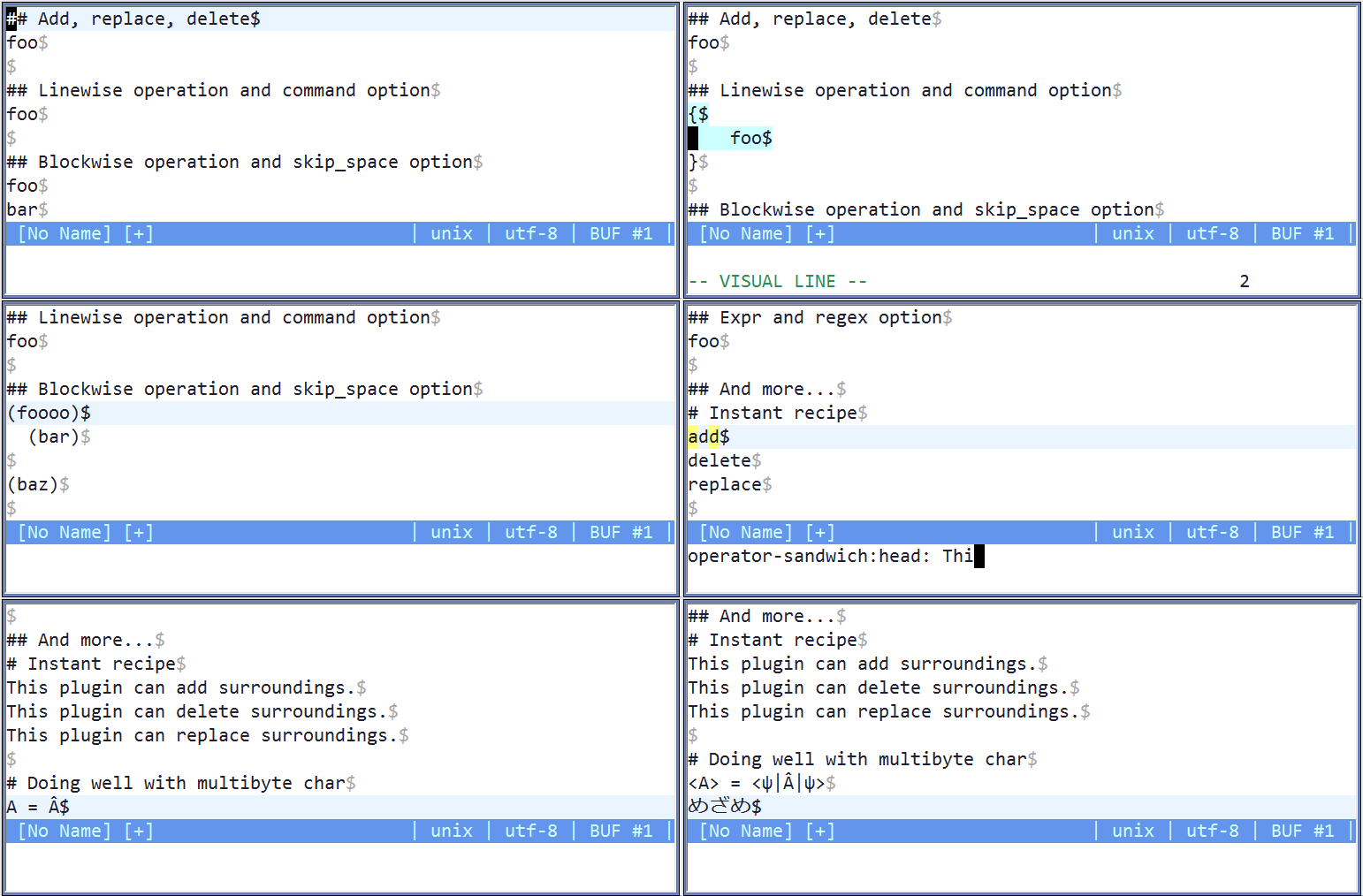
### Demo
# Pioneers
* [vim-surround](https://github.com/tpope/vim-surround)
* [vim-operator-surround](https://github.com/rhysd/vim-operator-surround)
* [vim-textobj-multiblock](https://github.com/osyo-manga/vim-textobj-multiblock)
* [vim-textobj-anyblock](https://github.com/rhysd/vim-textobj-anyblock)
* [vim-textobj-between](https://github.com/thinca/vim-textobj-between)