mirror of
https://github.com/git-quick-stats/git-quick-stats.git
synced 2025-12-21 12:13:52 +01:00
Compare commits
18 Commits
| Author | SHA1 | Date | |
|---|---|---|---|

|
71d414eb4a | ||

|
d8346210a4 | ||
|
|
b85760e8b9 | ||

|
07ad3b57a7 | ||
|
|
dec1c4e103 | ||

|
2a0294941f | ||
|
|
22f1b3563d | ||

|
628b31ffd8 | ||
|
|
1e5723d7a2 | ||
|
|
0c1749a560 | ||
|
|
ecab54c630 | ||
|
|
7219205696 | ||
|
|
dd3c97816e | ||

|
d2b273eead | ||
|
|
5b08bb0b52 | ||
|
|
08d1a5a6e3 | ||
|
|
f5c2b82f02 | ||

|
bf29c19cf5 |
5
.gitignore
vendored
5
.gitignore
vendored
@@ -7,4 +7,7 @@
|
||||
.Spotlight*
|
||||
.Trash*
|
||||
**/*~
|
||||
nbproject/*
|
||||
nbproject/*
|
||||
/tests/test-git/.git/
|
||||
#/tests/test-git/*
|
||||
!/tests/test-git/resetgit
|
||||
|
||||
1
Makefile
1
Makefile
@@ -3,6 +3,7 @@ _INSTDIR ?= $(DESTDIR)$(PREFIX)
|
||||
BINDIR ?= $(_INSTDIR)/bin
|
||||
MANDIR ?= $(_INSTDIR)/share/man
|
||||
TASK_DONE = echo -e "\n✓ $@ done\n"
|
||||
SHELL := $(shell which bash)
|
||||
|
||||
.PHONY: test
|
||||
|
||||
|
||||
153
README.md
153
README.md
@@ -5,7 +5,8 @@
|
||||
>
|
||||
> Any git repository may contain tons of information about commits, contributors, and files. Extracting this information is not always trivial, mostly because there are a gadzillion options to a gadzillion git commands – I don’t think there is a single person alive who knows them all. Probably not even [Linus Torvalds](https://github.com/torvalds) himself :).
|
||||
|
||||
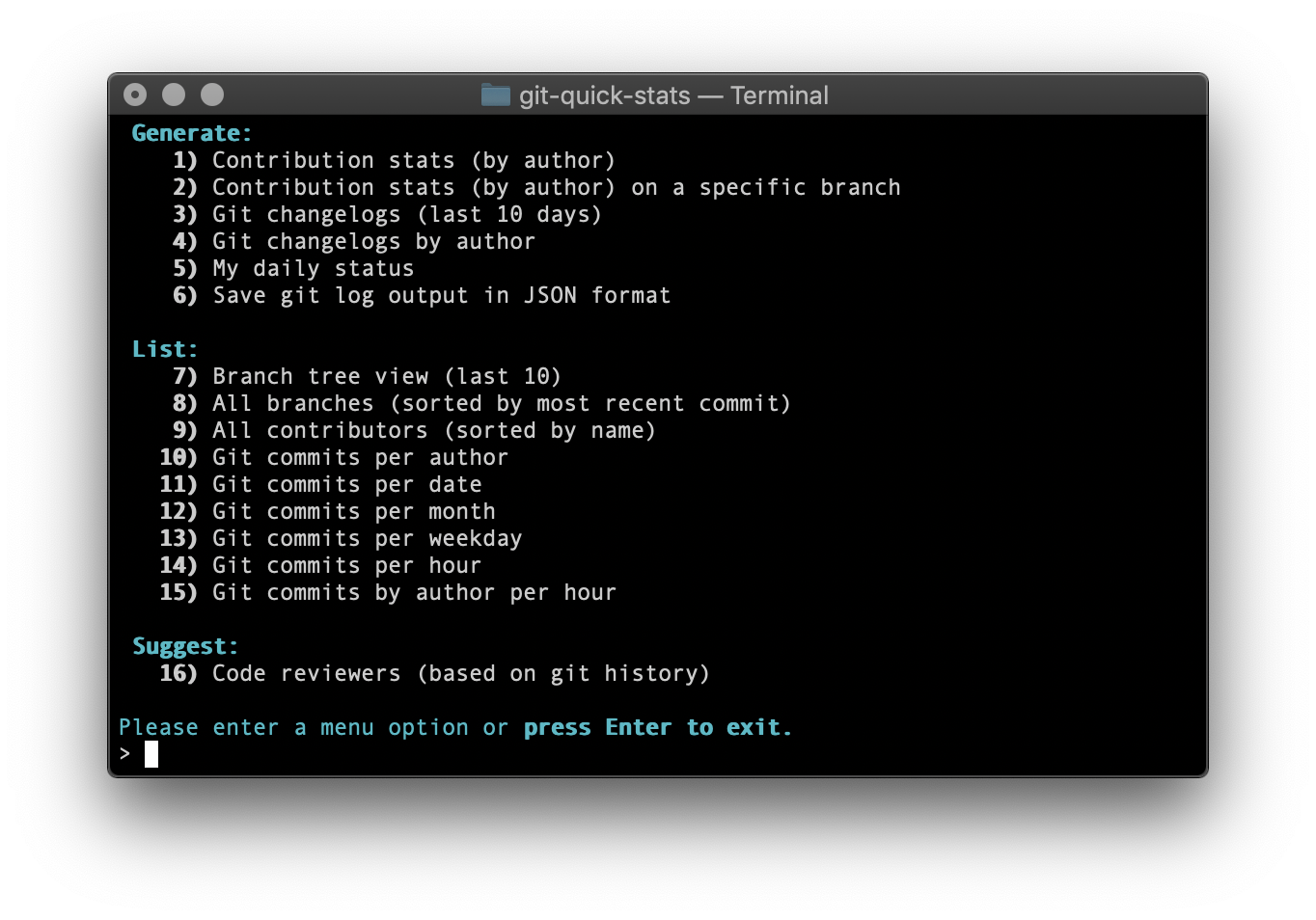
|
||||
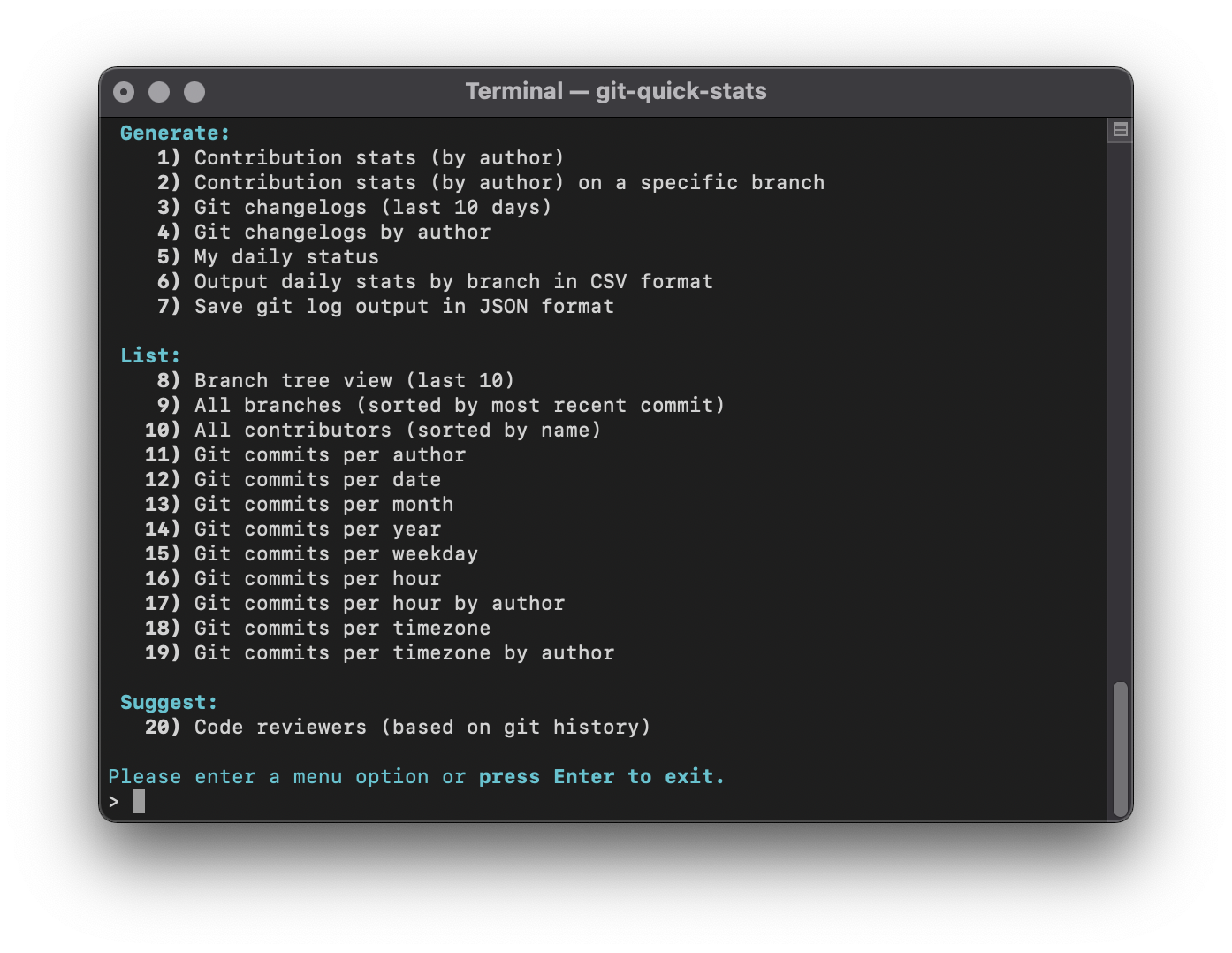
|
||||
|
||||
|
||||
## Table of Contents
|
||||
|
||||
@@ -53,15 +54,15 @@
|
||||
|
||||
## Screenshots
|
||||
|
||||

|
||||

|
||||
|
||||

|
||||

|
||||
|
||||
## Usage
|
||||
|
||||
### Interactive
|
||||
|
||||
git-quick-stats has a built-in interactive menu that can be executed as such:
|
||||
`git-quick-stats` has a built-in interactive menu that can be executed as such:
|
||||
|
||||
```bash
|
||||
git-quick-stats
|
||||
@@ -92,40 +93,53 @@ git quick-stats <optional-command-to-execute-directly>
|
||||
Possible arguments in short and long form:
|
||||
|
||||
```bash
|
||||
-r, --suggest-reviewers
|
||||
show the best people to contact to review code
|
||||
-T, --detailed-git-stats
|
||||
give a detailed list of git stats
|
||||
-R, --git-stats-by-branch
|
||||
see detailed list of git stats by branch
|
||||
-d, --commits-per-day
|
||||
displays a list of commits per day
|
||||
-m, --commits-by-month
|
||||
displays a list of commits per month
|
||||
-w, --commits-by-weekday
|
||||
displays a list of commits per weekday
|
||||
-o, --commits-by-hour
|
||||
displays a list of commits per hour
|
||||
-A, --commits-by-author-by-hour
|
||||
displays a list of commits per hour by author
|
||||
-a, --commits-per-author
|
||||
displays a list of commits per author
|
||||
-S, --my-daily-stats
|
||||
see your current daily stats
|
||||
-C, --contributors
|
||||
see a list of everyone who contributed to the repo
|
||||
-b, --branch-tree
|
||||
show an ASCII graph of the git repo branch history
|
||||
-D, --branches-by-date
|
||||
show branches by date
|
||||
-c, --changelogs
|
||||
see changelogs
|
||||
-L, --changelogs-by-author
|
||||
see changelogs by author
|
||||
-j, --json-output
|
||||
save git log as a JSON formatted file to a specified area
|
||||
-h, -?, --help
|
||||
display this help text in the terminal
|
||||
GENERATE OPTIONS
|
||||
-T, --detailed-git-stats
|
||||
give a detailed list of git stats
|
||||
-R, --git-stats-by-branch
|
||||
see detailed list of git stats by branch
|
||||
-c, --changelogs
|
||||
see changelogs
|
||||
-L, --changelogs-by-author
|
||||
see changelogs by author
|
||||
-S, --my-daily-stats
|
||||
see your current daily stats
|
||||
-V, --csv-output-by-branch
|
||||
output daily stats by branch in CSV format
|
||||
-j, --json-output
|
||||
save git log as a JSON formatted file to a specified area
|
||||
|
||||
LIST OPTIONS
|
||||
-b, --branch-tree
|
||||
show an ASCII graph of the git repo branch history
|
||||
-D, --branches-by-date
|
||||
show branches by date
|
||||
-C, --contributors
|
||||
see a list of everyone who contributed to the repo
|
||||
-a, --commits-per-author
|
||||
displays a list of commits per author
|
||||
-d, --commits-per-day
|
||||
displays a list of commits per day
|
||||
-Y, --commits-by-year
|
||||
displays a list of commits per year
|
||||
-m, --commits-by-month
|
||||
displays a list of commits per month
|
||||
-w, --commits-by-weekday
|
||||
displays a list of commits per weekday
|
||||
-o, --commits-by-hour
|
||||
displays a list of commits per hour
|
||||
-A, --commits-by-author-by-hour
|
||||
displays a list of commits per hour by author
|
||||
-z, --commits-by-timezone
|
||||
displays a list of commits per timezone
|
||||
-Z, --commits-by-author-by-timezone
|
||||
displays a list of commits per timezone by author
|
||||
|
||||
SUGGEST OPTIONS
|
||||
-r, --suggest-reviewers
|
||||
show the best people to contact to review code
|
||||
-h, -?, --help
|
||||
display this help text in the terminal
|
||||
```
|
||||
|
||||
### Git log since and until
|
||||
@@ -149,7 +163,7 @@ export _GIT_LIMIT=20
|
||||
|
||||
### Git log options
|
||||
|
||||
You can set _GIT_LOG_OPTIONS for [git log options](https://git-scm.com/docs/git-log#_options):
|
||||
You can set `_GIT_LOG_OPTIONS` for [git log options](https://git-scm.com/docs/git-log#_options):
|
||||
|
||||
```bash
|
||||
export _GIT_LOG_OPTIONS="--ignore-all-space --ignore-blank-lines"
|
||||
@@ -171,22 +185,30 @@ export _GIT_PATHSPEC=':!package-lock.json'
|
||||
|
||||
### Git merge view strategy
|
||||
|
||||
You can set the variable `_GIT_MERGE_VIEW` to enable merge commits to be part of the stats by setting `_GIT_MERGE_VIEW` to `enable`. You can also choose to only show merge commits by setting `_GIT_MERGE_VIEW` to `exclusive`. Default is to not show merge commits. These work similar to git's built-in `--merges` and `--no-merges` log options.
|
||||
You can set the variable `_GIT_MERGE_VIEW` to enable merge commits to be part of the stats by setting `_GIT_MERGE_VIEW` to `enable`. You can also choose to only show merge commits by setting `_GIT_MERGE_VIEW` to `exclusive`. Default is to not show merge commits. These work similar to git's built-in `--merges` and `--no-merges` log options.
|
||||
|
||||
```bash
|
||||
export _GIT_MERGE_VIEW="enable"
|
||||
export _GIT_MERGE_VIEW="exclusive"
|
||||
```
|
||||
|
||||
### Git branch
|
||||
|
||||
You can set the variable `_GIT_BRANCH` to set the branch of the stats. Works with commands `--git-stats-by-branch` and `--csv-output-by-branch`.
|
||||
|
||||
```bash
|
||||
export _GIT_BRANCH="master"
|
||||
```
|
||||
|
||||
### Color themes
|
||||
|
||||
You can change to the legacy color scheme by toggling the variable `_MENU_THEME` between `default` and `legacy`
|
||||
|
||||
```bash
|
||||
export _MENU_THEME=legacy
|
||||
export _MENU_THEME="legacy"
|
||||
```
|
||||
|
||||
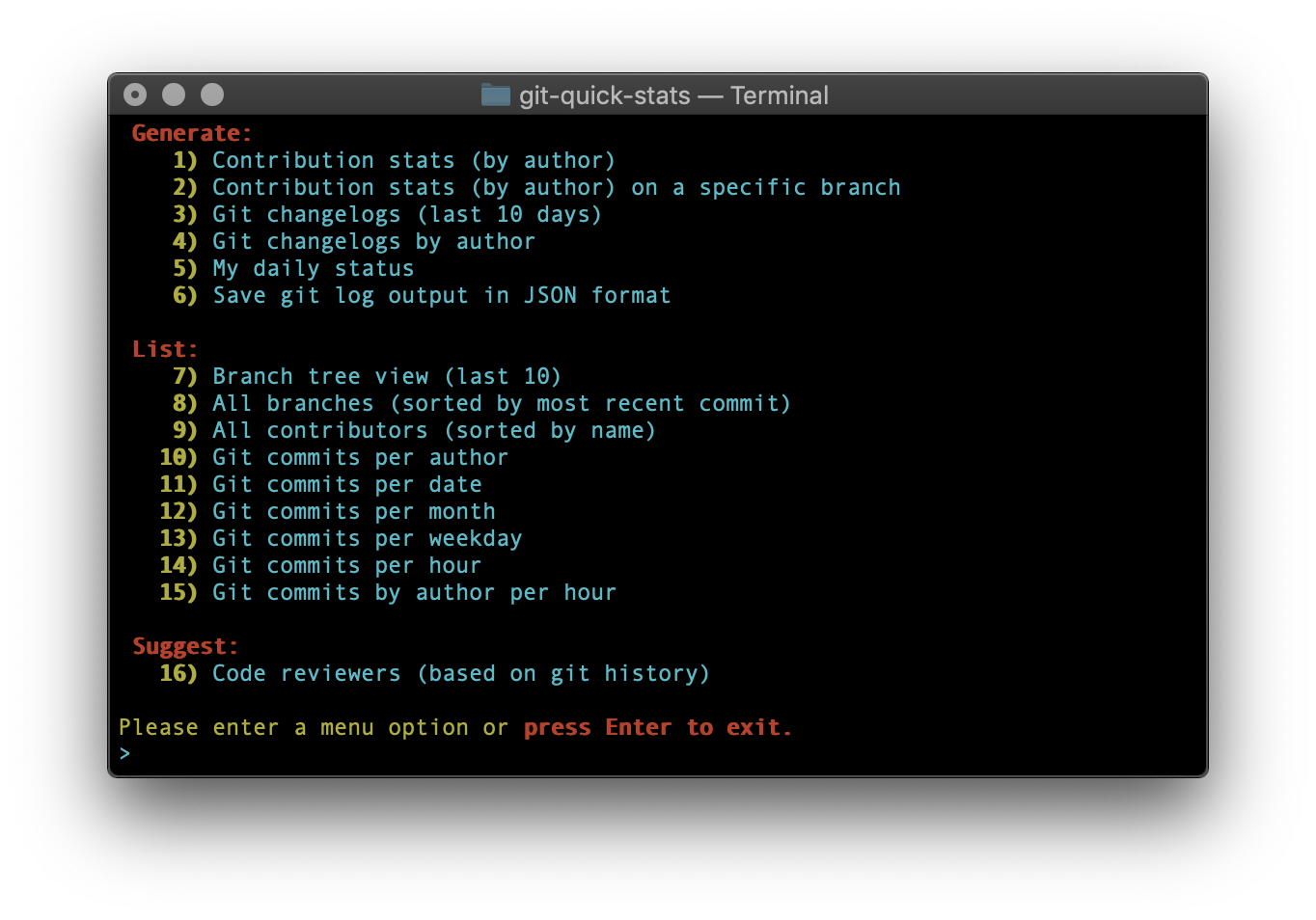
|
||||
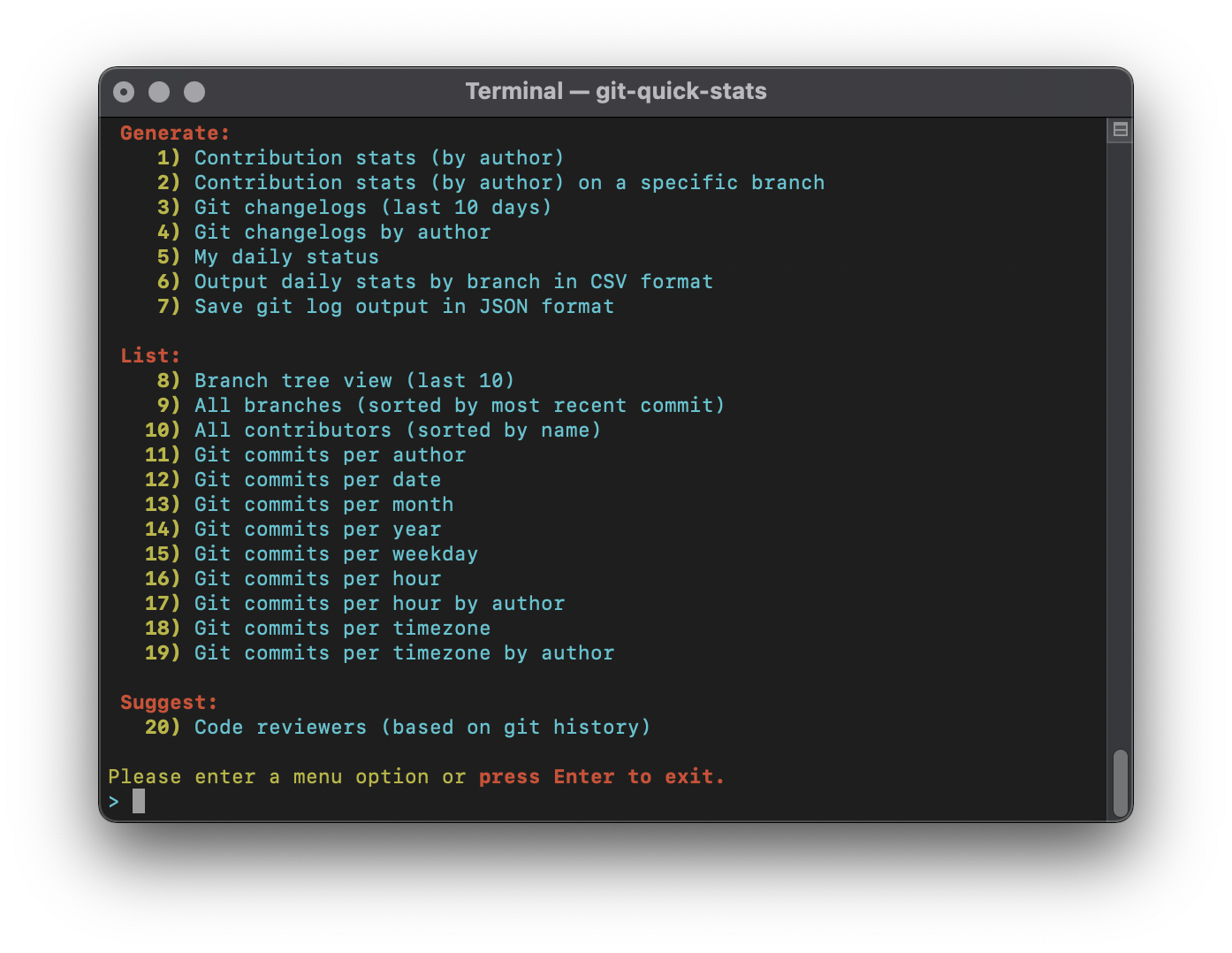
|
||||
|
||||
## Installation
|
||||
|
||||
@@ -245,7 +267,24 @@ You can use the Docker image provided:
|
||||
## System requirements
|
||||
|
||||
* An OS with a Bash shell
|
||||
* Tools we use: awk ; basename ; cat ; column ; echo ; git ; grep ; head ; seq ; sort ; tput ; tr ; uniq ; wc
|
||||
* Tools we use:
|
||||
|
||||
```bash
|
||||
awk
|
||||
basename
|
||||
cat
|
||||
column
|
||||
echo
|
||||
git
|
||||
grep
|
||||
head
|
||||
printf
|
||||
seq
|
||||
sort
|
||||
tput
|
||||
tr
|
||||
uniq
|
||||
```
|
||||
|
||||
### Dependencies
|
||||
|
||||
@@ -308,25 +347,29 @@ MIT see [LICENSE][] for the full license text.
|
||||
## Contributors
|
||||
|
||||
This project exists thanks to all the people who contribute.
|
||||
<a href="https://github.com/arzzen/git-quick-stats/graphs/contributors"><img src="https://opencollective.com/git-quick-stats/contributors.svg?width=890&button=false" /></a>
|
||||
|
||||
[](https://github.com/arzzen/git-quick-stats/graphs/contributors)
|
||||
|
||||
### Backers
|
||||
|
||||
Thank you to all our backers! 🙏 [[Become a backer](https://opencollective.com/git-quick-stats#backer)]
|
||||
|
||||
<a href="https://opencollective.com/git-quick-stats#backers" target="_blank"><img src="https://opencollective.com/git-quick-stats/backers.svg?width=890"></a>
|
||||
[](https://opencollective.com/git-quick-stats#backers)
|
||||
|
||||
### Sponsors
|
||||
|
||||
Support this project by becoming a sponsor. Your logo will show up here with a link to your website. [[Become a sponsor](https://opencollective.com/git-quick-stats#sponsor)]
|
||||
|
||||
<a href="https://opencollective.com/git-quick-stats/sponsor/0/website" target="_blank"><img src="https://opencollective.com/git-quick-stats/sponsor/0/avatar.svg?v=1"></a>
|
||||
<a href="https://opencollective.com/git-quick-stats/sponsor/1/website" target="_blank"><img src="https://opencollective.com/git-quick-stats/sponsor/1/avatar.svg"></a>
|
||||
<a href="https://opencollective.com/git-quick-stats/sponsor/2/website" target="_blank"><img src="https://opencollective.com/git-quick-stats/sponsor/2/avatar.svg"></a>
|
||||
<a href="https://opencollective.com/git-quick-stats/sponsor/3/website" target="_blank"><img src="https://opencollective.com/git-quick-stats/sponsor/3/avatar.svg"></a>
|
||||
<a href="https://opencollective.com/git-quick-stats/sponsor/4/website" target="_blank"><img src="https://opencollective.com/git-quick-stats/sponsor/4/avatar.svg"></a>
|
||||
<a href="https://opencollective.com/git-quick-stats/sponsor/5/website" target="_blank"><img src="https://opencollective.com/git-quick-stats/sponsor/5/avatar.svg"></a>
|
||||
<a href="https://opencollective.com/git-quick-stats/sponsor/6/website" target="_blank"><img src="https://opencollective.com/git-quick-stats/sponsor/6/avatar.svg"></a>
|
||||
<a href="https://opencollective.com/git-quick-stats/sponsor/7/website" target="_blank"><img src="https://opencollective.com/git-quick-stats/sponsor/7/avatar.svg"></a>
|
||||
<a href="https://opencollective.com/git-quick-stats/sponsor/8/website" target="_blank"><img src="https://opencollective.com/git-quick-stats/sponsor/8/avatar.svg"></a>
|
||||
<a href="https://opencollective.com/git-quick-stats/sponsor/9/website" target="_blank"><img src="https://opencollective.com/git-quick-stats/sponsor/9/avatar.svg"></a>
|
||||
[](https://opencollective.com/git-quick-stats/sponsor/0/website)
|
||||
[](https://opencollective.com/git-quick-stats/sponsor/1/website)
|
||||
[](https://opencollective.com/git-quick-stats/sponsor/2/website)
|
||||
[](https://opencollective.com/git-quick-stats/sponsor/3/website)
|
||||
[](https://opencollective.com/git-quick-stats/sponsor/4/website)
|
||||
[](https://opencollective.com/git-quick-stats/sponsor/5/website)
|
||||
[](https://opencollective.com/git-quick-stats/sponsor/6/website)
|
||||
[](https://opencollective.com/git-quick-stats/sponsor/7/website)
|
||||
[](https://opencollective.com/git-quick-stats/sponsor/8/website)
|
||||
[](https://opencollective.com/git-quick-stats/sponsor/9/website)
|
||||
|
||||
[](https://quaestor.com/?utm_source=github&utm_category=sponsor)
|
||||
|
||||
|
||||
961
git-quick-stats
961
git-quick-stats
File diff suppressed because it is too large
Load Diff
@@ -1,13 +1,13 @@
|
||||
.TH git-quick-stats "1" "January 2020" "git-quick-stats" "User Commands"
|
||||
.TH git-quick-stats "1" "June 2021" "git-quick-stats" "User Commands"
|
||||
.SH NAME
|
||||
.B git\-quick\-stats
|
||||
.B git\-quick\-stats
|
||||
\- Simple and efficient way to access various stats in a git repository.
|
||||
.SH SYNOPSIS
|
||||
.PP
|
||||
For non\-interactive mode:
|
||||
For non\-interactive mode:
|
||||
.B git\-quick\-stats [OPTIONS]
|
||||
.PP
|
||||
For interactive mode:
|
||||
For interactive mode:
|
||||
.B git-quick-stats
|
||||
.PP
|
||||
.SH DESCRIPTION
|
||||
@@ -17,12 +17,7 @@ and files. Extracting this information is not always trivial, mostly because
|
||||
of a gadzillion options to a gadzillion git commands.
|
||||
This program allows you to see detailed information about a git repository.
|
||||
.PP
|
||||
.SH OPTIONS
|
||||
.HP
|
||||
\fB\-r\fR, \fB\-\-suggest\-reviewers\fR
|
||||
.IP
|
||||
show the best people to contact to review code
|
||||
.HP
|
||||
.SH GENERATE OPTIONS
|
||||
.PP
|
||||
\fB\-T\fR, \fB\-\-detailed\-git\-stats\fR
|
||||
.IP
|
||||
@@ -34,6 +29,52 @@ give a detailed list of git stats
|
||||
see detailed list of git stats by branch
|
||||
.HP
|
||||
.PP
|
||||
\fB\-c\fR, \fB\-\-changelogs\fR
|
||||
.IP
|
||||
see changelogs
|
||||
.HP
|
||||
.PP
|
||||
\fB\-L\fR, \fB\-\-changelogs\-by\-author\fR
|
||||
.IP
|
||||
see changelogs by author
|
||||
.HP
|
||||
.PP
|
||||
\fB\-S\fR, \fB\-\-my\-daily\-stats\fR
|
||||
.IP
|
||||
see your current daily stats
|
||||
.HP
|
||||
.PP
|
||||
\fB\-V\fR, \fB\-\-csv\-output\-by\-branch\fR
|
||||
.IP
|
||||
output daily stats by branch in CSV format
|
||||
.HP
|
||||
.PP
|
||||
\fB\-j\fR, \fB\-\-json\-output\fR
|
||||
.IP
|
||||
save git log as a JSON formatted file to a specified area
|
||||
.HP
|
||||
.SH LIST OPTIONS
|
||||
.PP
|
||||
\fB\-b\fR, \fB\-\-branch\-tree\fR
|
||||
.IP
|
||||
show an ASCII graph of the git repo branch history
|
||||
.HP
|
||||
.PP
|
||||
\fB\-D\fR, \fB\-\-branches\-by\-date\fR
|
||||
.IP
|
||||
show branches by date
|
||||
.HP
|
||||
.PP
|
||||
\fB\-C\fR, \fB\-\-contributors\fR
|
||||
.IP
|
||||
see a list of everyone who contributed to the repo
|
||||
.HP
|
||||
.PP
|
||||
\fB\-a\fR, \fB\-\-commits\-per\-author\fR
|
||||
.IP
|
||||
displays a list of commits per author
|
||||
.HP
|
||||
.PP
|
||||
\fB\-d\fR, \fB\-\-commits\-per\-day\fR
|
||||
.IP
|
||||
displays a list of commits per day
|
||||
@@ -44,6 +85,11 @@ displays a list of commits per day
|
||||
displays a list of commits per month
|
||||
.HP
|
||||
.PP
|
||||
\fB\-Y\fR, \fB\-\-commits\-by\-year\fR
|
||||
.IP
|
||||
displays a list of commits per year
|
||||
.HP
|
||||
.PP
|
||||
\fB\-w\fR, \fB\-\-commits\-by\-weekday\fR
|
||||
.IP
|
||||
displays a list of commits per weekday
|
||||
@@ -59,44 +105,20 @@ displays a list of commits per hour
|
||||
displays a list of commits per hour by author
|
||||
.HP
|
||||
.PP
|
||||
\fB\-a\fR, \fB\-\-commits\-per\-author\fR
|
||||
\fB\-z\fR, \fB\-\-commits\-by\-timezone\fR
|
||||
.IP
|
||||
displays a list of commits per author
|
||||
displays a list of commits per timezone
|
||||
.HP
|
||||
.PP
|
||||
\fB\-S\fR, \fB\-\-my\-daily\-stats\fR
|
||||
\fB\-Z\fR, \fB\-\-commits\-by\-author\-by\-timezone\fR
|
||||
.IP
|
||||
see your current daily stats
|
||||
displays a list of commits per timezone by author
|
||||
.HP
|
||||
.SH SUGGEST OPTIONS
|
||||
.PP
|
||||
\fB\-C\fR, \fB\-\-contributors\fR
|
||||
\fB\-r\fR, \fB\-\-suggest\-reviewers\fR
|
||||
.IP
|
||||
see a list of everyone who contributed to the repo
|
||||
.HP
|
||||
.PP
|
||||
\fB\-b\fR, \fB\-\-branch\-tree\fR
|
||||
.IP
|
||||
show an ASCII graph of the git repo branch history
|
||||
.HP
|
||||
.PP
|
||||
\fB\-D\fR, \fB\-\-branches\-by\-date\fR
|
||||
.IP
|
||||
show branches by date
|
||||
.HP
|
||||
.PP
|
||||
\fB\-c\fR, \fB\-\-changelogs\fR
|
||||
.IP
|
||||
see changelogs
|
||||
.HP
|
||||
.PP
|
||||
\fB\-L\fR, \fB\-\-changelogs\-by\-author\fR
|
||||
.IP
|
||||
see changelogs by author
|
||||
.HP
|
||||
.PP
|
||||
\fB\-j\fR, \fB\-\-json\-output\fR
|
||||
.IP
|
||||
save git log as a JSON formatted file to a specified area
|
||||
show the best people to contact to review code
|
||||
.HP
|
||||
.PP
|
||||
\fB\-h\fR, \-?, \fB\-\-help\fR
|
||||
@@ -131,6 +153,9 @@ You can also set _GIT_MERGE_VIEW to only show merge commits, example:
|
||||
You can switch to the legacy color scheme, example:
|
||||
.PP
|
||||
.B export _MENU_THEME=legacy
|
||||
.PP
|
||||
You can set _GIT_BRANCH to set the branch of the stats, example:
|
||||
.PP
|
||||
.B export _GIT_BRANCH="master"
|
||||
.
|
||||
.fi
|
||||
|
||||
|
||||
@@ -79,7 +79,7 @@ assert_end() {
|
||||
tests_endtime="$(date +%s%N)"
|
||||
# required visible decimal place for seconds (leading zeros if needed)
|
||||
local tests_time="$( \
|
||||
printf "%010d" "$(( ${tests_endtime/%N/000000000}
|
||||
printf "%010d" "$(( ${tests_endtime/%N/000000000}
|
||||
- ${tests_starttime/%N/000000000} ))")" # in ns
|
||||
tests="$tests_ran ${*:+$* }tests"
|
||||
[[ -n "$DISCOVERONLY" ]] && echo "collected $tests." && _assert_reset && return
|
||||
@@ -105,7 +105,7 @@ assert_end() {
|
||||
assert() {
|
||||
# assert <command> <expected stdout> [stdin]
|
||||
(( tests_ran++ )) || :
|
||||
[[ -z "$DISCOVERONLY" ]] || return
|
||||
[[ -z "$DISCOVERONLY" ]] || return 0
|
||||
expected=$(echo -ne "${2:-}")
|
||||
result="$(eval 2>/dev/null $1 <<< ${3:-})" || true
|
||||
if [[ "$result" == "$expected" ]]; then
|
||||
@@ -115,13 +115,13 @@ assert() {
|
||||
result="$(sed -e :a -e '$!N;s/\n/\\n/;ta' <<< "$result")"
|
||||
[[ -z "$result" ]] && result="nothing" || result="\"$result\""
|
||||
[[ -z "$2" ]] && expected="nothing" || expected="\"$2\""
|
||||
_assert_fail "expected $expected${_indent}got $result" "$1" "$3"
|
||||
_assert_fail "expected $expected${_indent}got $result" "$1" "${3:-}"
|
||||
}
|
||||
|
||||
assert_raises() {
|
||||
# assert_raises <command> <expected code> [stdin]
|
||||
(( tests_ran++ )) || :
|
||||
[[ -z "$DISCOVERONLY" ]] || return
|
||||
[[ -z "$DISCOVERONLY" ]] || return 0
|
||||
status=0
|
||||
(eval $1 <<< ${3:-}) > /dev/null 2>&1 || status=$?
|
||||
expected=${2:-0}
|
||||
@@ -129,7 +129,12 @@ assert_raises() {
|
||||
[[ -z "$DEBUG" ]] || echo -n .
|
||||
return
|
||||
fi
|
||||
_assert_fail "program terminated with code $status instead of $expected" "$1" "$3"
|
||||
_assert_fail "program terminated with code $status instead of $expected" "$1" "${3:-}"
|
||||
}
|
||||
|
||||
assert_success() {
|
||||
# assert_success <command>
|
||||
assert_raises "$1" 0
|
||||
}
|
||||
|
||||
# _assert_with_grep <grep modifiers> <command> <expected output...>
|
||||
|
||||
@@ -19,39 +19,51 @@ DESCRIPTION
|
||||
|
||||
This program allows you to see detailed information about a git repository.
|
||||
|
||||
OPTIONS
|
||||
-r, --suggest-reviewers
|
||||
show the best people to contact to review code
|
||||
GENERATE OPTIONS
|
||||
-T, --detailed-git-stats
|
||||
give a detailed list of git stats
|
||||
-R, --git-stats-by-branch
|
||||
see detailed list of git stats by branch
|
||||
-c, --changelogs
|
||||
see changelogs
|
||||
-L, --changelogs-by-author
|
||||
see changelogs by author
|
||||
-S, --my-daily-stats
|
||||
see your current daily stats
|
||||
-V, --csv-output-by-branch
|
||||
output daily stats by branch in CSV format
|
||||
-j, --json-output
|
||||
save git log as a JSON formatted file to a specified area
|
||||
|
||||
LIST OPTIONS
|
||||
-b, --branch-tree
|
||||
show an ASCII graph of the git repo branch history
|
||||
-D, --branches-by-date
|
||||
show branches by date
|
||||
-C, --contributors
|
||||
see a list of everyone who contributed to the repo
|
||||
-a, --commits-per-author
|
||||
displays a list of commits per author
|
||||
-d, --commits-per-day
|
||||
displays a list of commits per day
|
||||
-m, --commits-by-month
|
||||
displays a list of commits per month
|
||||
-Y, --commits-by-year
|
||||
displays a list of commits per year
|
||||
-w, --commits-by-weekday
|
||||
displays a list of commits per weekday
|
||||
-o, --commits-by-hour
|
||||
displays a list of commits per hour
|
||||
-A, --commits-by-author-by-hour
|
||||
displays a list of commits per hour by author
|
||||
-a, --commits-per-author
|
||||
displays a list of commits per author
|
||||
-S, --my-daily-stats
|
||||
see your current daily stats
|
||||
-C, --contributors
|
||||
see a list of everyone who contributed to the repo
|
||||
-b, --branch-tree
|
||||
show an ASCII graph of the git repo branch history
|
||||
-D, --branches-by-date
|
||||
show branches by date
|
||||
-c, --changelogs
|
||||
see changelogs
|
||||
-L, --changelogs-by-author
|
||||
see changelogs by author
|
||||
-j, --json-output
|
||||
save git log as a JSON formatted file to a specified area
|
||||
-z, --commits-by-timezone
|
||||
displays a list of commits per timezone
|
||||
-Z, --commits-by-author-by-timezone
|
||||
displays a list of commits per timezone by author
|
||||
|
||||
SUGGEST OPTIONS
|
||||
-r, --suggest-reviewers
|
||||
show the best people to contact to review code
|
||||
-h, -?, --help
|
||||
display this help text in the terminal
|
||||
|
||||
@@ -69,17 +81,26 @@ ADDITIONAL USAGE
|
||||
You can also set _GIT_MERGE_VIEW to only show merge commits
|
||||
ex: export _GIT_MERGE_VIEW=exclusive
|
||||
You can set _MENU_THEME to display the legacy color scheme
|
||||
ex: export _MENU_THEME=legacy"
|
||||
ex: export _MENU_THEME=legacy
|
||||
You can set _GIT_BRANCH to set the branch of the stats
|
||||
ex: export _GIT_BRANCH=master"
|
||||
|
||||
assert_raises "$src fail" 1
|
||||
|
||||
assert_contains "$src --suggest-reviewers" "Suggested code reviewers (based on git history)"
|
||||
assert_raises "$src --suggest-reviewers" 0
|
||||
assert_success "$src --suggest-reviewers"
|
||||
|
||||
assert_contains "$src --detailed-git-stats" "Contribution stats"
|
||||
assert_raises "$src --detailed-git-stats" 0
|
||||
assert_success "$src --detailed-git-stats"
|
||||
|
||||
assert_contains "$src --commits-per-day" "Git commits per date"
|
||||
assert_raises "$src --commits-per-day" 0
|
||||
assert_success "$src --commits-per-day"
|
||||
|
||||
assert_startswith "$src --commits-by-year" "Git commits by year"
|
||||
assert_success "$src --commits-by-year"
|
||||
|
||||
export LC_TIME=POSIX
|
||||
assert_startswith "$src --commits-by-year" "Git commits by year"
|
||||
assert_success "$src --commits-by-year"
|
||||
|
||||
assert_end
|
||||
|
||||
17
tests/test-git/resetgit
Executable file
17
tests/test-git/resetgit
Executable file
@@ -0,0 +1,17 @@
|
||||
#!/bin/sh
|
||||
# Initialises a new local Git repo for test purpose.
|
||||
if test -d ../test-git/.git; then rm -Rf ../test-git/.git; fi
|
||||
#mkdir test-git
|
||||
cd ../test-git
|
||||
git init
|
||||
git config user.name "$(printf %s 'Test Git,\nfor test purpose')"
|
||||
git config user.email "TestGit\o/@example.org"
|
||||
|
||||
#printf '\n[user]\nname = test-git\nemail = test-git@example.org\n'> .git/config
|
||||
printf 'test-git\n========\n' > README.md
|
||||
git add README.md
|
||||
git commit -m 'added readme (o\w/o)' -m 'in markdown, no \r\n, only \n' -m 'a very "simple" readme'
|
||||
testChars="$(printf 'tab [%b] form feed [%b] line feed [%b] carriage return [%b]' '\x09' '\x0C' '\x0A' '\x0D')"
|
||||
#printf '# testChars [%s]\n' "$testChars">&2
|
||||
git notes add -m 'Some notes' -m 'out of ascii: été au cœur' -m "$testChars"
|
||||
git log
|
||||
Reference in New Issue
Block a user