 Yee Cheng Chin
91d6fa59e7
Yee Cheng Chin
91d6fa59e7
Updated to Vim 9.1.1887

This update is still built against macOS 15 Sequoia, and does not
contain any specific fixes or improvements for macOS 26 Tahoe. That will
come in a future update.

Announcements
====================

Moving macOS 10.13 - 10.15 support to legacy release
--------------------

Currently, MacVim binary releases are available in two versions: a
normal version (macOS 10.13 or above), and a legacy version (macOS
10.9-10.12). Starting next release (r183), the normal version will
require macOS 11 or above (due to Xcode 26 requirements), and macOS
10.13-10.15 users will need to use the legacy version instead. This will
mostly be a transparent change, and the updater will automatically
update to the right version. The legacy version should be almost
identical to said users as they are using older versions of macOS that
can't make use of newer OS features to begin with.

In the future we may remove support for macOS 10.9-10.12 but for now
they are still supported.

Features
====================

Better mouse support
--------------------

- Scroll wheels should feel much better to use in MacVim. A small scroll
  is now guaranteed to scroll at least one line, and shift-scrolling
  (horizontal scroll) works correctly now. You can now also turn off
  macOS's scroll wheel acceleration to scroll a fixed amount of lines in
  the "Input" settings pane. #1566
- Mouse buttons 4 and 5 can now be bound to `<X1Mouse>` and `<X2Mouse>`
  in Vim mappings (`:h X1Mouse`). #1534

New Vim Features
====================

- Diff mode improvements
    - Vim diff can now highlight per-character or per-word differences
      within a line. Per-character highlighting is now used by default.
      See `:h 'diffopt'` under "inline". v9.1.1243
    - Diff anchors allow for more explicit controls over how and where
      the diff algorithm aligns text across files (`:h diff-anchors`).
      v9.1.1557
- Lots of auto-completion improvements. Some highlights below:
    - New option: `autocomplete`. Get completion suggestions as you
      type. See `:h ins-autocompletion`. v9.1.1590
    - Fuzzy matching now uses the fzf algorithm. v9.1.1627
    - Popup menu borders can now be styled (`:h 'pumborder'` / `:h
      'completepopup'`). v9.1.1835 / v9.1.1856
    - Can now specify a custom completion source when using insert-mode
      completion (`:h 'complete'`). v9.1.1301
    - `set completeopt+=nearest` will sort completion items by proximity
      to the cursor. v9.1.1308
    - Command-line completion
        - Search commands like `/` and `:g` can be tab-completed now.
          v9.1.1490 v9.1.1526
        - Commands like `:filetype` and `:highlight` have better
          auto-completion. v9.1.1340 / v9.1.1138
- New vertical tab panel (`:h tabpanel`). v9.1.1391
- new bundled optional plugins (use `packadd` to enable them):
    - hlyank (`:h package-hlyank`): Briefly highlight region of last
      yank command
- new commands:
    - `:uniq` (`:h :uniq`): Remove duplicate adjacent lines v9.1.1477

General
====================

- Sparkle (updater for MacVim) is now updated to 2.8.0. #1605

Security Fixes
====================

- Fixed MacVim erroneously setting the get-task-allow entitlement, which
  could allow another user-installed application to inspect it
  (CVE-2025-8597) #1585

Fixes
====================

- Fixed issue where macOS services (available in the "Services" menu)
  could not insert text when not in visual mode. #1571 #1569
- Fixed issue where guifont did not accept PostScript names with
  underscores (e.g. "CascadiaMono-Regular_Light"). #1600
- MacVim now uses the standard `v:colornames` variable for choosing
  highlight colors. #1568
- Vim syntax now understands MacVim-specific function
  `showdefinition()`. #1601

Compatibility
====================

Requires macOS 10.9 or above. (10.9 - 10.12 requires downloading a
separate legacy build)

Script interfaces have compatibility with these versions:

- Lua 5.4
- Perl 5.34
- Python2 2.7
- Python3 3.9 or above
- Ruby 3.4

MacVim



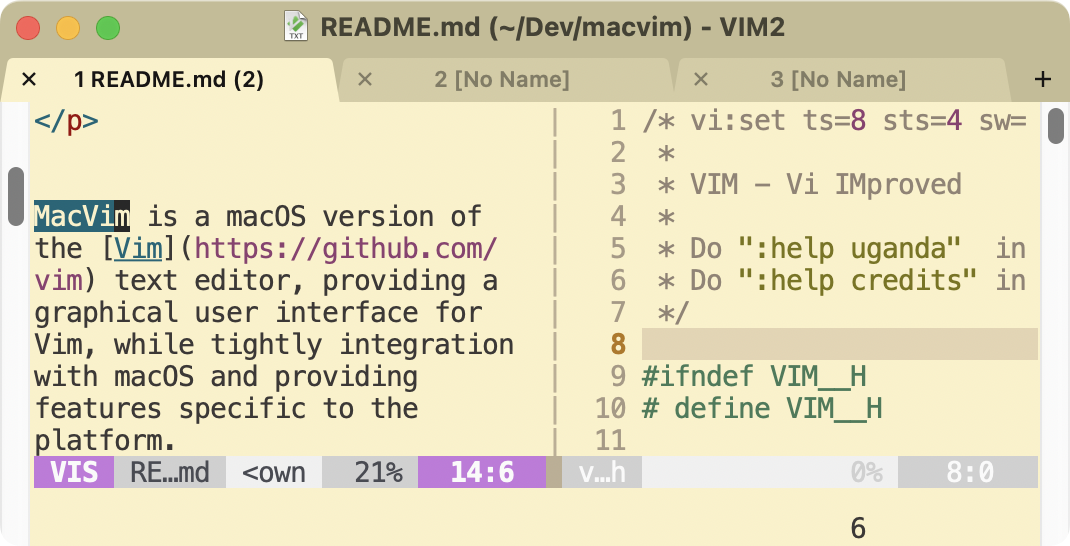
MacVim is a macOS version of the Vim text editor, providing a graphical user interface for Vim, while tightly integrating with macOS and providing features specific to the platform.
Features
- Smooth native GUI that supports menus, dialog boxes, toolbars, and scroll bars.
- Native and non-native full-screen modes.
- Trackpad gestures, Touch Bar, and Command key shortcuts can be mapped to Vim actions.
- Integrates with system services, dictionary lookup, and Apple Intelligence Writing Tools.
- Vim GUI tabs with customizable colors.
- Font ligatures and accurate text rendering.
Getting Started
See installation documentation for more details and alternative methods to install.
Download
You can download the latest version of MacVim from the Releases page.
Install via Package Manager
If you would like to install using a package manager, MacVim can be installed via Homebrew:
brew install macvim
MacVim is also available as a Homebrew cask. It will install the same pre-built binary as the one available from GitHub release:
brew install --cask macvim-app
After installation, MacVim can be launched using the Dock or in the terminal using the mvim command.
Building from Source
If you prefer to build MacVim from source, detailed instructions are provided in the Building MacVim guide.
Relationship with Vim
MacVim is a downstream fork of Vim, and routinely merges from upstream. The original Vim README can be found at README_vim.md. Vim itself is also available for macOS, but it does not have a GUI.
In Homebrew, there are both a macvim and vim package. Both packages will provide a terminal version of Vim with similar features. The vim package is from the upstream Vim project and is usually a bit more up-to-date in core Vim features, while the macvim package will provide the additional GUI version bundled as an app.
License
MacVim is released under the Vim License.
Support
If you encounter any issues or have questions, feel free to open an issue or visit the discussions page.