
[ ]
]

qlImageSize
This is a QuickLook plugin for OS X 10.11+ to display the dimensions of an image and its file size in the title bar.

This plugin can also preview and generate Finder thumbnails for unsupported images formats like :


mdImageSize
It's a Spotlight plugin to display informations of unsupported images (WebP, bpg, Portable Pixmap) in the Finder's inspector window.
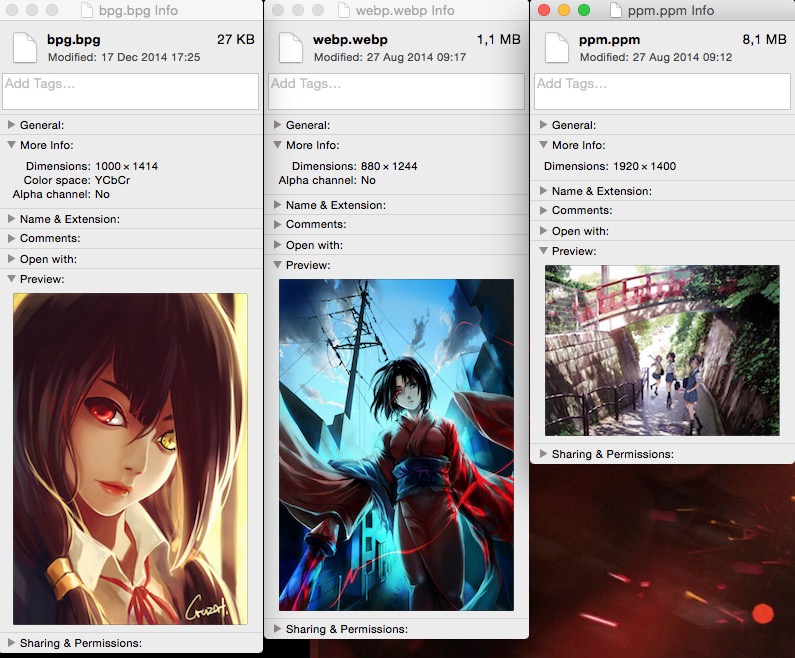
Installation
2 choices :
- Build from sources using Xcode. (just have to hit the build button)
- L1cardo forked the project and offers a built version : https://github.com/L1cardo/qlImageSize
Uninstall
- Launch Terminal.app (in
/Applications/Utilities) - Copy and paste the following line into the Terminal :
sudo rm -rf "/Library/Application Support/qlimagesize" "~/Library/QuickLook/qlImageSize.qlgenerator" "~/Library/Spotlight/mdImageSize.mdimporter"
- Press Enter.
- Type your password and press Enter.
Limitations
If you are a Pixelmator user, its own QuickLook plugin might get in the way when previewing WebP files. To fix this you need to edit the file /Applications/Pixelmator.app/Contents/Library/QuickLook/PixelmatorLook.qlgenerator/Contents/Info.plist and remove the dict entry that handles webp.
After editing the Info.plist, the QuickLook for Pixelmator file format (such as .pxm) might not work due to Code Signing, you can unsign the Pixelmator's QuickLook binary using this tool, unsign. After downloading and make the tool, unsign the binary inside MacOS/ , it will create another binary with the extension unsigned, rename the orignal binary for backup then remove the extension for the unsigned binary.
./unsign /Applications/Pixelmator.app/Contents/Library/QuickLook/PixelmatorLook.qlgenerator/Contents/MacOS/PixelmatorLook
License
qlImageSize is released under the Simplified BSD license, see LICENSE.